
Privacy
Privacy. What Airc sends, what it never sends, and how to turn it off.
The app
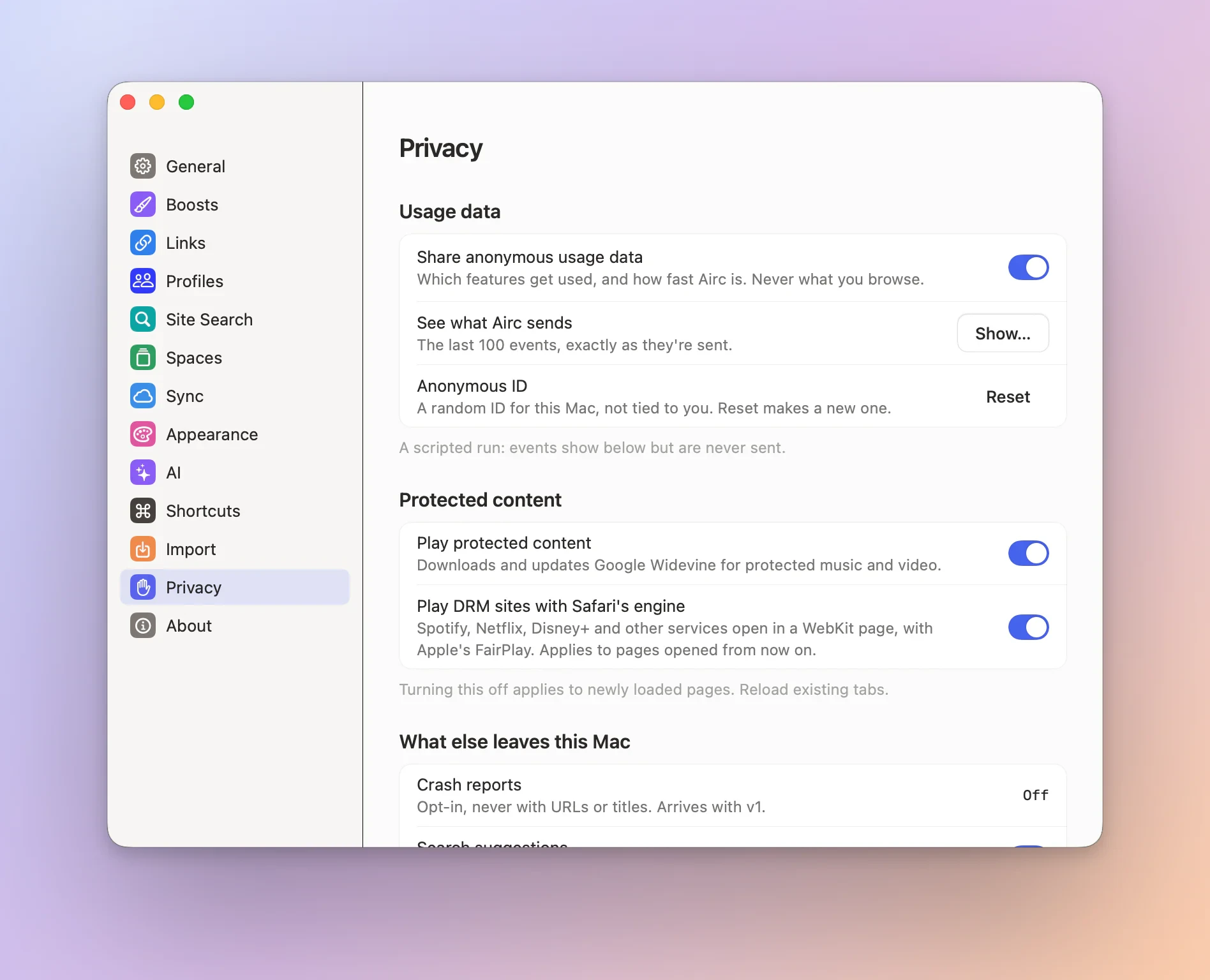
Airc sends anonymous product usage events to PostHog’s EU cloud (eu.i.posthog.com): which features get used,
and how fast Airc is. It is on by default. Events carry a random ID made on your Mac, never your name, an account,
or anything you browse, type or name. To turn it off, open Settings → Privacy and switch off Share anonymous
usage data.
What is sent
Every event carries the same build details: the Airc version and build number, the channel (dev or stable), the
engine (Chromium or WebKit), the macOS version (major.minor, for example 26.6), the processor (arm64 or x86_64), the
language code of your Mac (for example en, never the region), and how many days ago the random ID was made, in
ranges (0, 1, 2-7, 8-30 …).
| Event | When | What else it carries |
|---|---|---|
app.launched |
each launch, when the first window shows | launch time in ranges, first launch or not, whether the last run ended cleanly or crashed |
app.active_day |
once per calendar day you use Airc | how many Spaces, profiles, pinned tabs, Favorites and open tabs, in ranges; the sidebar side; whether Airc is the default browser |
onboarding.step |
each step of the first run | the step (password_manager is the password manager step), and next, skip or back |
onboarding.finished |
“Open Airc” | whether you imported from Arc |
import.arc |
an Arc import | success or failure; Spaces, tabs and profiles in ranges; whether logins came over |
import.browser |
an import from another browser, a bookmarks file or a passwords CSV file | which browser (chrome, brave, edge, vivaldi, opera, chromium, dia, helium, firefox, zen, safari, bookmarks_file or passwords_file); success or failure; profiles, bookmarks, folders, history entries and passwords in ranges; never a bookmark, page, site or password |
feature.used |
a feature is used | the feature’s name, and for some a variant from a fixed list (below) |
perf.daily |
once per day | Command Bar opening time (median and 95th percentile, in ranges), memory use and background CPU, in ranges |
process.gone |
a renderer, GPU or utility helper ends abnormally | process_type: renderer, gpu, network, storage, audio, utility:data_decoder, utility:video_capture or other; exit_signal: SIGSEGV, SIGBUS, SIGILL, SIGABRT, SIGTRAP, SIGFPE, SIGSYS, SIGKILL, SIGTERM, exit or other; no URLs or paths |
The features: the Command Bar (new tab or edit URL), split view (made with 2, 3 or 4 panes, pinned, made a
Favorite), Peek (opened, opened as a tab), Little Airc (from the shortcut or a link from another app), picture in
picture (video, call or document), a new Space, a new profile, a new Favorite, an Air Traffic Control rule, Find,
the Back/Forward history menu, a download started or finished, Site Controls, the default-browser prompt (shown,
accepted, declined), an extension installed (never which), an update installed, the sidebar’s update button shown
or clicked, a theme change, Live Calendar turned on or a meeting joined from it (never the meeting, its link or
its time), a Boost changed in its editor (never the site, its style or its code), a private window opened
(nothing about its pages, ever), and a tab preview’s quick action (pin, unpin, add to or remove from Favorites,
split, Peek; never the tab, its site or its title), a shortcut changed in Settings → Shortcuts (never which
command or key), Tidy tab titles turned on or off in Settings → AI (never a title, a page or a name;
ai.md), a Capture copied, saved or shared (feature capture, variant copy, save or share; never
the page, its site, the picture or where it went, and nothing from a private window; capture.md), and
Ask on Page, link previews and Tidy downloads (features ai.ask_page, ai.link_preview, ai.tidy_downloads, variant
on or off when turned on or off in Settings → AI, used for a question asked, a link preview shown (at most once a
minute) or a suggested file name applied; never a question, an answer, a page, an address, a summary or a file name,
and nothing from a private window; ai.md), and a note made (feature note.create, variant shortcut,
command_bar or plus_menu; never what it says, its title, its pictures or where it is; notes.md), and
how the password manager step ended (feature password_manager.step, variant installed, not_installed, builtin
or skipped; never which password manager, extension or profile; password-manager.md).
Numbers are only ever sent as ranges: “6-10 Spaces”, “250-500 ms”, never the exact value.
What is never sent
Web addresses, hosts or domains; page titles; anything you type or search; history; the names or emojis of Spaces,
profiles or folders; account names or emails; extension IDs or names; file names; error messages; your IP
address as a property. Airc’s events are built from fixed lists in the code (packages/AircKit/Sources/AircKit/ Telemetry/TelemetryEvent.swift), so none of these can reach them: there is no event that takes text. A unit test
serialises every event and fails on any property or value outside a strict list.
Feedback isn’t telemetry: Help › Send Feedback… sends only what you write and tick, when you click Send, to aircbrowser.com rather than PostHog, and shows it all first (feedback.md).
PostHog receives each batch over HTTPS from your Mac’s internet connection, so like any web server it sees the
address the request comes from. Airc asks it not to look up a location from it ($geoip_disable) and marks every
event anonymous ($process_person_profile: false), so PostHog keeps no profile of you.
Crash reports
When Airc or one of its helper processes (a page’s renderer, the GPU process) crashes, macOS usually writes a crash
report on your Mac. Airc’s main process is often too big for macOS to report, so Airc also writes a small crash record
of its own the moment it crashes, in CrashRecords in its data folder (the last three are kept, and every build writes
them). At the next launch, Airc sends its own new crash reports to PostHog’s error tracking as $exception events,
with the same random ID and build details as the usage events. A crash that both macOS and Airc recorded is sent once:
the two are matched by build, time and process, and macOS’s report goes when it’s there. If Share with app
developers is on in macOS (System Settings → Privacy & Security → Analytics & Improvements), macOS also hands
Airc reports of hangs and of too much CPU or disk use (MetricKit), and Airc sends those the same way.
A crash report carries:
- the crashed thread’s stack: for each frame, the binary it’s in, the offset into it, and the function name macOS worked out (Airc’s own record has no names: PostHog finds them, below);
- the names of those binaries (only Airc’s own, Sparkle’s and macOS’s; any other binary shows as
other), their UUIDs and where they were loaded; - the exception type, signal, the signal’s code and termination code (for example
EXC_BAD_ACCESS,SIGSEGV), and which process it was (the browser, a renderer, the GPU process, another helper); - the Airc version and build that crashed, and the macOS version (for example 26.6);
- where the report came from (
crash_source:signalfor Airc’s own record,ipsfor macOS’s,metrickit).
Airc’s own record holds no more than that: the build, the signal, its code and the address that faulted, the crashed thread’s return addresses, and the name, UUID and load address of each of Airc’s and macOS’s binaries those fall in. The faulting address and the process ID stay on your Mac, as they do from macOS’s reports: Airc uses them only to tell one crash from another.
It never carries file paths (they can hold your user name: binaries go by their file name only), the environment,
thread or queue names, the crash or exception message (it can quote a web address or what a page held), registers or
memory, or anything about what you were browsing. Airc reads only crash reports of its own processes, only those
written since it last looked, at most 10 a launch, and only while sharing is on: a crash from while it was off is
never sent. The strings in a report (binary and function names) are checked against strict formats, and a unit test
(packages/AircKit/Tests/AircKitTests/CrashReportTests.swift) fails on any key or value outside a strict list.
PostHog turns the offsets into function names and source lines with Airc’s debug symbols, which the build uploads.
When a renderer, GPU or utility helper ends abnormally, Airc also counts it (process.gone, in the table above) with only the kind
of process and the signal.
Crash reports show in See what Airc sends like every other event. To stop sending them, switch off Share
anonymous usage data (below): the same switch covers both.
See what Airc sends
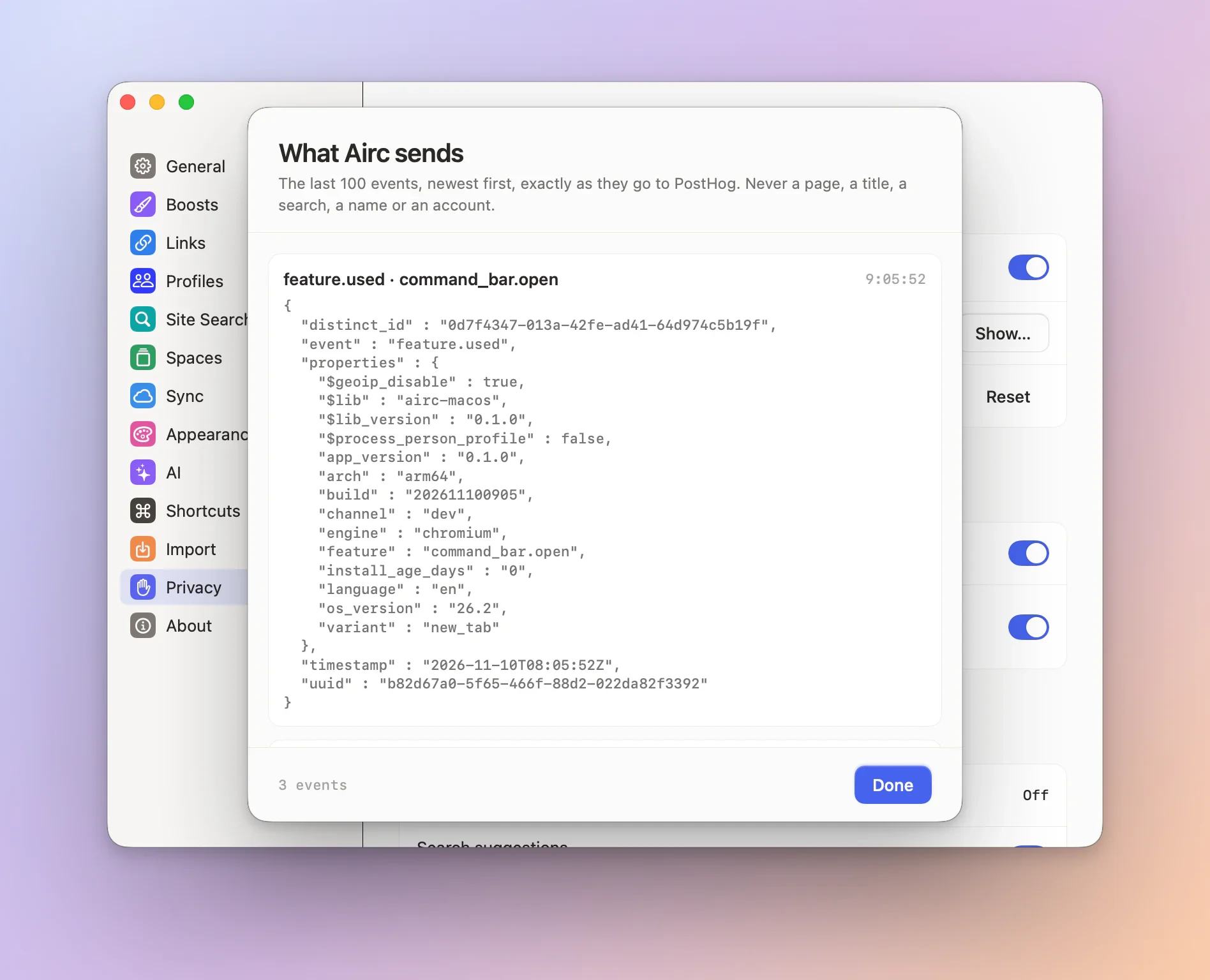
Settings → Privacy → See what Airc sends → Show… lists the last 100 events, newest first, as the exact JSON that goes to PostHog. The list updates live while it’s open.
How it is sent
Events wait on your Mac in ~/Library/Application Support/Airc/Telemetry/queue.json (at most 1,000) and go out in
batches: 30 seconds after the first one, at once when 20 are waiting, and when you quit. If PostHog can’t be reached,
Airc tries again later, waiting longer each time, and drops events older than a day. Nothing runs while no event is
waiting. The random ID is in install.json in the same folder.
Turning it off
-
Settings → Privacy → Share anonymous usage data. Turning it off throws away anything still waiting.
-
For good, from Terminal, which also locks the switch off:
defaults write "$(osascript -e 'id of app "Airc"')" AircTelemetryEnabled -bool falsedefaults delete "$(osascript -e 'id of app "Airc"')" AircTelemetryEnabledundoes it. -
With an environment variable:
AIRC_TELEMETRY_ENABLED=0when you start Airc from a shell. Apps opened from the Finder or the Dock don’t read your shell profile;launchctl setenv AIRC_TELEMETRY_ENABLED 0, then quit and reopen Airc, sets it for them until you log out.
Reset next to Anonymous ID in the same place makes a new random ID; nothing waiting under the old one is sent.
Builds without a PostHog project key (infra/release/telemetry.json, empty in source checkouts) record and send
nothing. Scripted and automated test runs never send to PostHog.
This website
aircbrowser.com counts visits with PostHog's EU cloud, the same project as the app: which pages and sections are viewed, the referring site, and which buttons and demos are used (the download button, the Spaces demo, the colour picker, the command bar).
It sets no cookies and stores nothing in your browser: each visit gets a random ID that is gone when you close the tab. Your IP address isn't kept and no location is looked up from it. There are no person profiles, no session recordings and no ads. If your browser sends Do Not Track, nothing is counted. The requests go to aircbrowser.com/ingest, which passes them to PostHog.
When you download Airc we count the download, with the country and the referring site's name (no IP address, no full web address, no cookie, nothing that identifies you), as one anonymous event in the same project.
The site is hosted on Vercel, which keeps standard request logs. Downloads and update feeds come from Vercel Blob. The countdown runs in your browser and sends nothing.
Questions about your data: hello@aircbrowser.com.
AI apps using Airc
When you let an AI app such as Claude use Airc (Settings → Agents), Airc connects to that app on your Mac and nothing else: no Airc server is involved. The app sees what you ask it to work on: the pages it opens, their text and screenshots of its own agent windows, and it sends them to its own service under its own privacy terms. It never gets your saved passwords, passkeys, cookies or Keychain items: Airc fills logins into the page itself. Private windows, your own windows and tabs, your history and your settings are never open to it.
Airc asks once before a new app can connect and keeps your answer on your Mac. It logs each call on your Mac (the app, the tool, the site's host, the time), never what was typed or what a page said. Nothing about agents is in Airc's usage data.
Shared links and the Boost Gallery
When you share a Space or a folder from Airc, its tab titles and web addresses are stored on aircbrowser.com so the link (aircbrowser.com/s/…) can show them. Nothing else: no account, no name, no cookies, history or page content, and nothing that says who shared it. The link stays until the copy of Airc that made it takes it back (Share Space… or Share Folder…, then Take Back); after that it's deleted and the link no longer works.
When you share an Easel, what's on its board is stored so the link (aircbrowser.com/e/…) can show it: its text, pictures, shapes, arrows and link cards. Addresses on it are web addresses without user names, passwords or sign-in parts; a Live Capture is its last picture. The same rules apply: nothing about who shared it, and Take Back deletes the Easel and its pictures. An Easel whose pictures never all arrived is deleted after a day.
A Boost you submit to the Boost Gallery is stored with the name and description you gave it, waiting for review. It's deleted if it's rejected, or after 30 days without review. Approved Boosts are public until they're removed. Reports about a Boost keep only the reason and your note, and are deleted once they've been handled.
To limit abuse, sharing counts requests per network for one hour. The count is kept under a keyed hash of your IP address, never the address itself. A count is deleted at your next request after its hour, or at the latest by the next day's cleanup. These records are stored in Vercel Blob.
Feedback
Help › Send Feedback… in Airc sends us only what you write, and only when you click Send: your message, a reply address if you give one, up to five pictures you add (ones you paste, drop or choose, or a picture of that Airc window as it shows, tabs and page included; never your screen or other apps, and never a private window), and, if you tick it, the app's details (the Airc version and build, the engine, the macOS version, the Mac model and your language and region setting). Airc redraws each picture before it goes, so the location, camera and other details stored in a photo stay on your Mac, and our server removes any that are left. Airc shows you all of it before it goes, and never adds web addresses, tabs, history or profiles. It's stored in Vercel Blob for us to read, and we get an email saying it arrived. We delete it once we've dealt with it, or whenever you ask: write tohello@aircbrowser.com. Sending counts against the same hourly limit per network as sharing.