Sidebar and Spaces
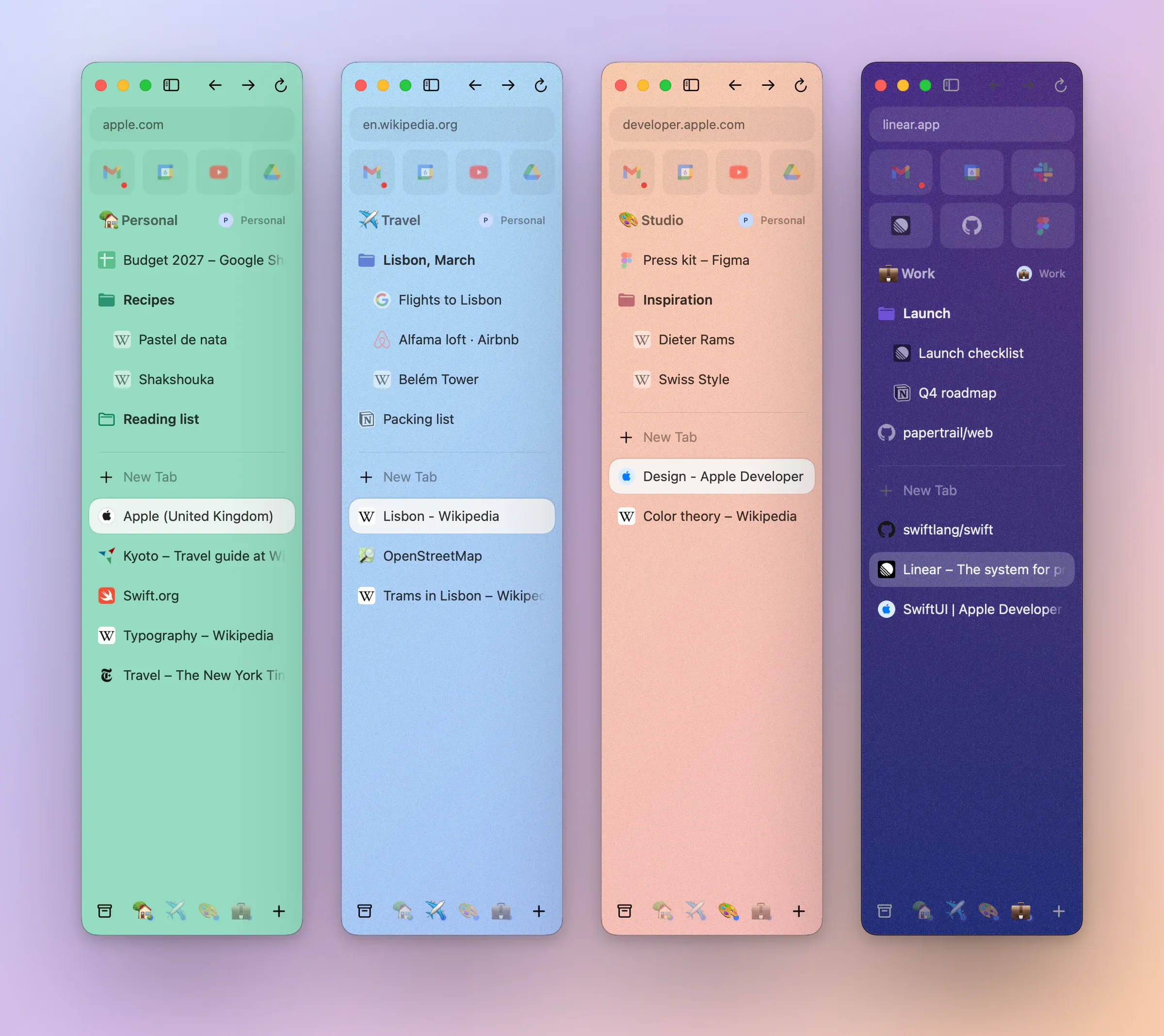
A sidebar for each part of your day. Arc's sidebar, with a colour and a profile for every Space.
Spaces
A colour, an icon and an order for each Space. Swipe between them.
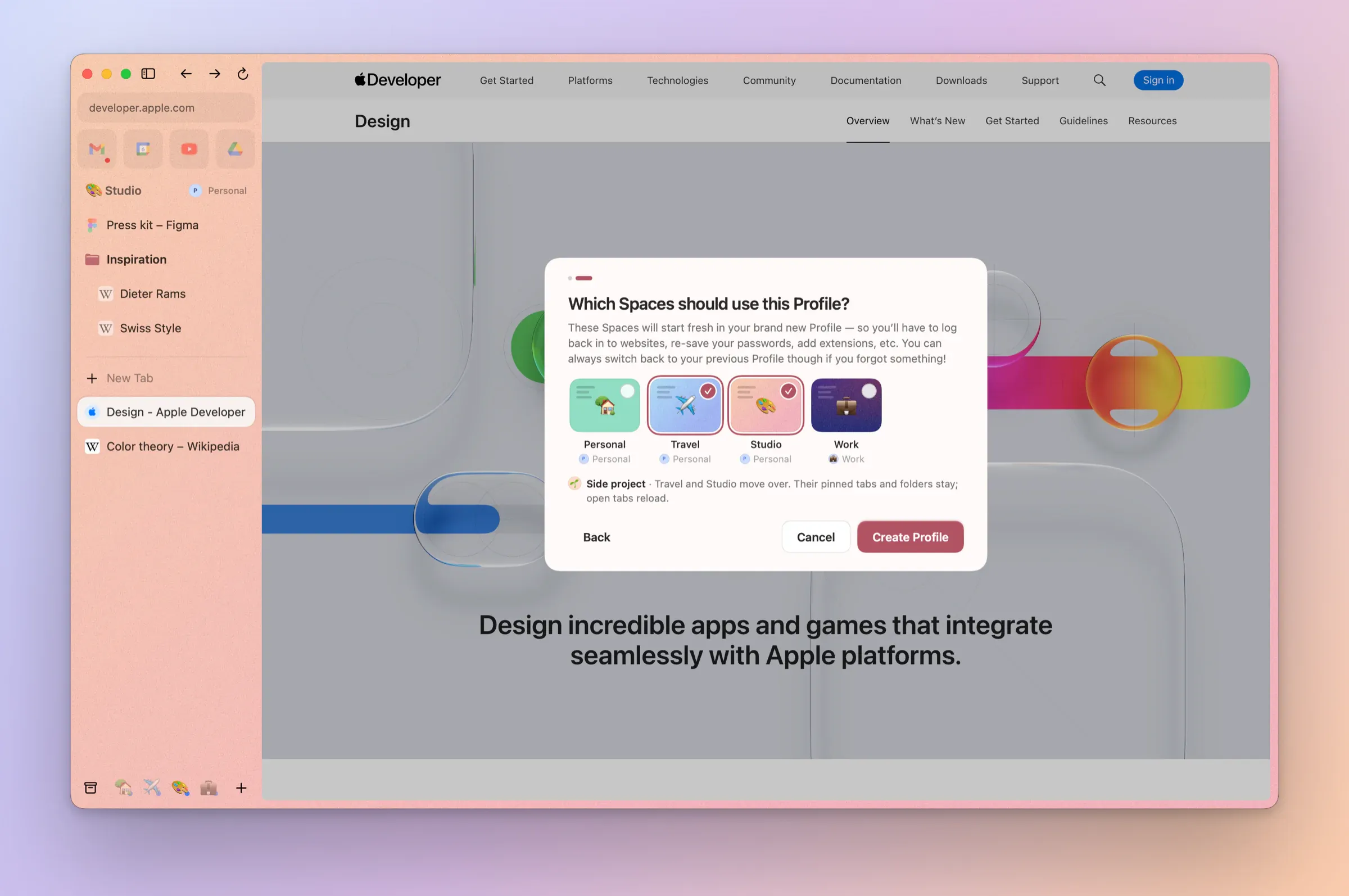
A profile per Space
Each Space can have its own logins, history and passwords. Two Gmail accounts, one window.
Pinned tabs and folders
Pin tabs, nest them in folders, drag to move and ⌥-drag to copy.
Fold the pinned tabsNew in 0.1.8
Click a Space's name to fold its pinned tabs away and again to bring them back, or press ← and →. The chevron turns, the rows slide as Arc's do, and each Space remembers. An only Space with no name hides its name row.
Favorites
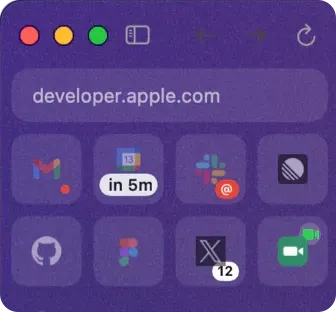
Your most-used sites as tiles at the top of the sidebar. One click goes back to where each one started.
Live Calendar
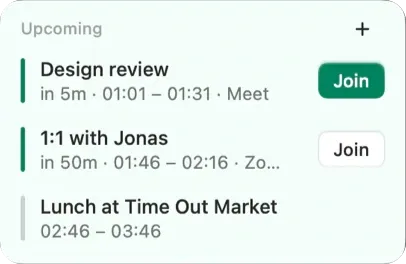
A Calendar Favorite counts down to your next meeting and offers Join. Turn it on in Settings → General.
Site previewsNew in 0.1.4
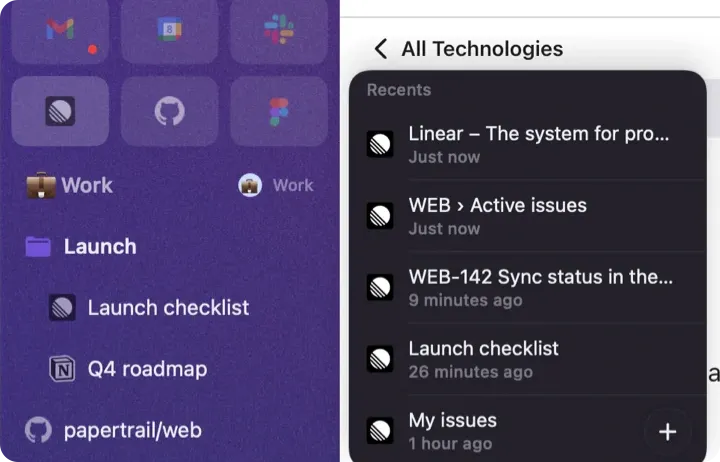
Rest on a pinned Notion, Linear, Figma or Confluence and see the pages you were just on, from your own history, without leaving the one you're on.
Mail previews and Peek EmailNew in 0.1.9
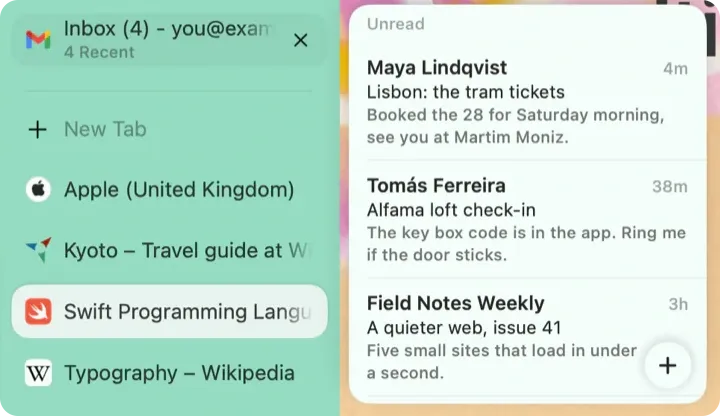
Rest on a pinned Gmail or Outlook to see your unread mail, newest first, read from the site's own page in that profile. Click one and it opens in Peek, or in the mail tab itself when no page from that profile is open.
Calendar previewsNew in 0.1.15
Rest on a pinned Google Calendar or Outlook calendar to see what's left of today and tomorrow, read from the calendar's own page in that profile, with no sign-in. Click an event to open it there.
Unread dots and soundNew in 0.1.5
Gmail, Slack, WhatsApp, Discord and other mail and chat Favorites show a dot while their title counts something unread. Right-click to turn it off for one. A Favorite playing sound shows a small swaying note, which stays still with Reduce Motion.
Badges for X, Slack, Calendar and callsNew in 0.1.11
An X Favorite shows its notification count, Slack a red @ when someone mentions you, and the Calendar Favorite's countdown turns bright five minutes before a meeting. A Favorite in a call, or shared into one, shows a green badge.
Calendar optionsNew in 0.1.3
Right-click the calendar Favorite for Arc's options: the time to your next meeting, its link and when it shows, and the hover preview.
Granola notes for callsNew in 0.1.36
Turn on Settings → General → Calendar → Start Granola notes when a call starts, and Airc asks Granola to start a note when a Meet, Zoom, Teams, Webex or Whereby tab turns on your microphone, once per call. Shown when Granola is installed.
Meetings as Arc counted themNew in 0.1.6
Live Calendar skips meetings you declined, all-day events and out-of-office time, keeps tentative ones, and its preview lists today, then tomorrow.
Light on memory
Tabs you haven't looked at in a while unload. Tabs with typed text, and calls, stay.
Select several tabsNew in 0.1.2
⌘-click or ⇧-click tabs, then move, pin, duplicate, archive or organize them together, with Undo.
Tab previewsNew in 0.1.2
Rest the pointer on a tab to see its page, with pin, Favorite, split and Peek one click away.
Tab preview optionsNew in 0.1.10
A tab's preview says how old its picture is when the tab isn't loaded. Right-click a pinned tab or Favorite and uncheck Show Hover Preview to turn its card off.
Manage SpacesNew in 0.1.2
Reorder, rename and restyle every Space in one card.
Several windowsNew in 0.1.2
⌘N opens another window on the same Spaces and tabs. A tab moves between windows without reloading.
Tear a tab outNew in 0.1.9
Drag a tab out of the sidebar onto the desktop and it opens in a window of its own right there, without reloading. Hold ⌥ for a copy.
Sidebar on the rightNew in 0.1.2
Settings → Appearance → Sidebar position.
Dark mode for all of AircNew in 0.1.33
Settings → Appearance → Airc: Auto follows your Mac, or choose Light or Dark for windows, the sidebar, Settings and every page, live. Spaces follow it unless you give one its own look.
Dark icons on dark sidebarsNew in 0.1.17
A site icon that's dark, like a black letter, gets a small light backing on a dark sidebar, as in Arc, so it doesn't vanish. In tabs, Favorites, the Command Bar and tab previews. Light themes and light icons look as before.
Chat and mail stay readyNew in 0.1.2
Pinned tabs and Favorites for chat and mail sites stay loaded when you switch away.
Set up a new profileNew in 0.1.2
Sign a new profile in to Google and pick suggested Favorites for it.
Drop files and foldersNew in 0.1.3
Files, folders, links and text dropped on the sidebar become tabs and folders, as in Arc.
Back to recent tabsNew in 0.1.3
⌃Tab goes back to your recent tabs, as in Arc.
Export a SpaceNew in 0.1.3
Export a Space as Markdown, or as bookmarks any browser imports.
An icon for any tabNew in 0.1.3
Change Icon… gives a Today tab its own icon, and it keeps it when pinned.
Folders in TodayNew in 0.1.4
Group Today tabs into folders without pinning them. With Apple Intelligence, Tidy in Today or Tidy Tabs in the Command Bar groups them for you, and tabs still archive by their own age.
GitHub Live FoldersNew in 0.1.4
New Live Folder… follows a repository's pull requests, your pull requests or your review requests. New ones arrive, merged and closed ones leave, and Keep in Folder makes one yours. Public repositories need no account.
Share a Space or folderNew in 0.1.4
Share Space… and Share Folder… make a link that opens in any browser. Choose what's in it, and take the link back whenever you like.
Move to a folderNew in 0.1.5
Right-click a tab or folder: Move to › lists this Space's folders as well as your other Spaces. With tabs selected, Archive Tabs Below and Archive Other Tabs tidy the rest, and ⌘T has Mute All Tabs and Pin to a folder.
Move Favorites and folders anywhereNew in 0.1.13
A Favorite's or folder's Move to › lists your Spaces by profile: a folder goes with everything inside it, a Favorite becomes a pinned tab there or joins another profile's Favorites. Turn a folder into a Space, or Reset Folder to send its tabs home. ⌘Z undoes each.
Sidebar menus, as in ArcNew in 0.1.13
Control-click anywhere in the sidebar opens the same menu as a right-click, in Arc's order. Control-clicking a tab's ✕ no longer closes it.
Select several tabs.